

The way businesses communicate, work, and collaborate has undergone a fundamental shift since the pandemic hit in 2020. The temporary shift to remote work has evolved into a new reality of hybrid working.
Teams collaborate across offices, cities, and time zones. Businesses rely heavily on tools to keep people connected. Conversations happen in chat applications, meetings take place on video platforms, files live in shared drives, and project updates are tracked elsewhere.
As a result, internal communication has evolved from a support function into a business priority.
But managing communication across platforms often creates more complexity than clarity. And needless to say employees spend valuable time switching between applications instead of focusing on work.
So, for growing organizations, these handy tools and processes can quickly turn into a disconnected system altogether, affecting productivity, decision-making, and business performance.
This is why organizations aren’t just looking for ways to communicate faster; they’re looking for ways to keep teams aligned, improve collaboration, and ensure information flows seamlessly across the business.
In this guide, we’ll explore the top internal communication tools available in the market in 2026–27, along with the key factors to consider when selecting the right platform.
Top Enterprise Communication Tools to Explore in 2026–27
As businesses look to simplify communication and reduce reliance on multiple disconnected applications, internal communication platforms are evolving beyond simple chat tools. Here are some of the leading solutions organizations are using to improve collaboration, visibility, and team alignment.
1. Google Workspace (Gmail, Chat, Meet, Drive)

Google Workspace is one of the world’s most adopted business communication and collaboration ecosystems.
The platform integrates email (Gmail), chat, video meetings, file storage, and cloud-based document editing.
Key Features
- Team chat and group communication
- Audio and video conferencing
- Shared workspaces for collaboration
- File sharing and cloud storage
- Tasks and activity management
- Document, spreadsheet, and presentation tools
Why It’s Great for 2026–27
A popular choice given how seamlessly its tools work together. From sharing a document to joining a meeting, or collaborating on a presentation, teams can move between applications with minimal friction.
Best For
2. Sarv Workspace
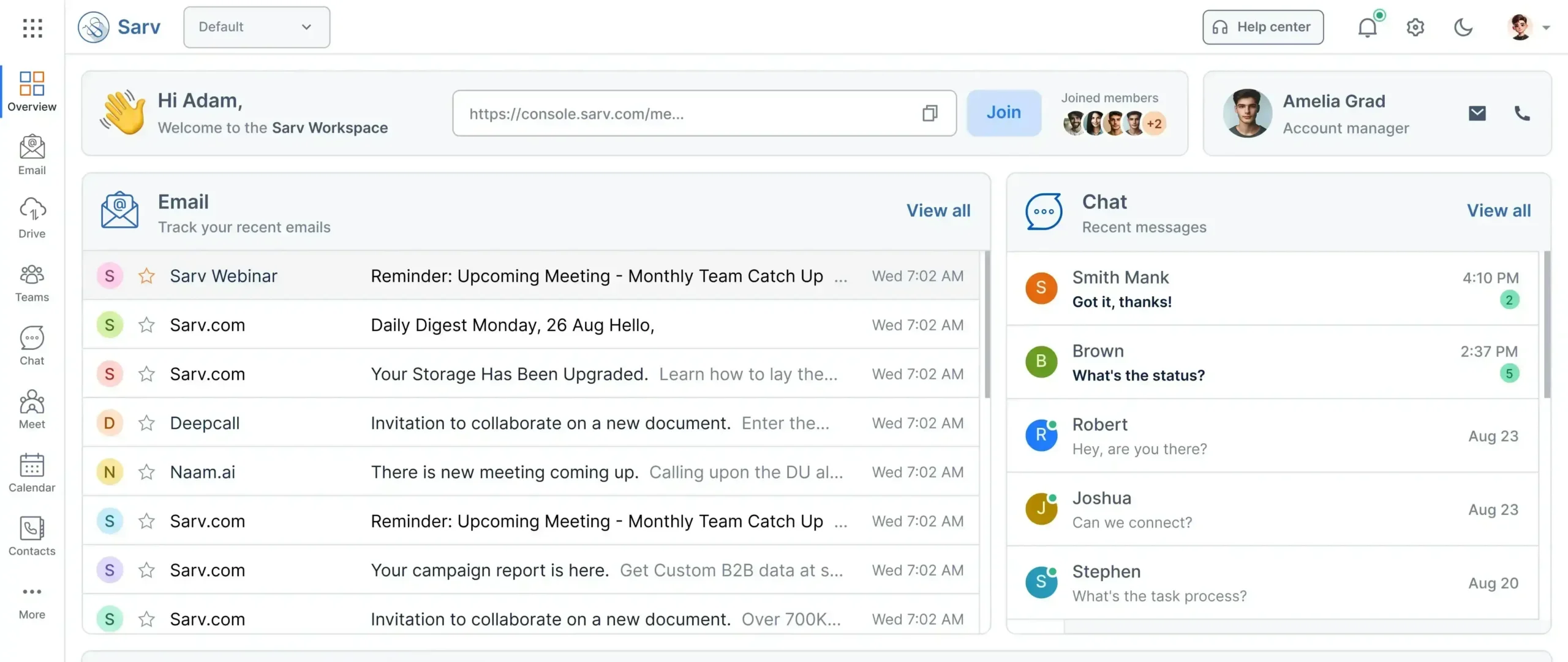
Sarv Workspace may be a relatively new entrant in the workplace collaboration space, but it’s already finding relevance among businesses looking for a simpler way to manage communication and teamwork. By bringing together conversations, meetings, file sharing, and collaboration in a unified platform, Sarv Workspace aims to reduce the friction that often comes with managing multiple applications.
Key Features
- Team chat and group communication
- Audio and video conferencing
- Shared workspaces for collaboration
- File sharing and cloud storage
- Tasks and activity management
- Document, spreadsheet, and presentation tools
Why It’s Becoming Popular
There are tons of workplace tools available in the market. In fact, many organizations already use separate applications for messaging, meetings, file sharing, and collaboration. The challenge is keeping work organized when information and conversations are spread across multiple places.
Sarv Workspace is gaining recognition because it takes a more integrated approach. Instead of treating communication and collaboration as separate activities, it brings them closer together, helping teams work in a more connected and organized way.
Best for startups, growing businesses, hybrid teams, and enterprises looking to bring everyday communication into a unified workspace.
What Makes Sarv Workspace Different?
Sarv Workspace is part of a growing category of platforms that aim to make communication, collaboration, and information sharing feel more connected and easier to manage.
This makes it particularly relevant for organizations looking to simplify their technology stack while improving visibility and collaboration across teams.
Explore more about sarv workspace here.
3. Microsoft Outlook + Microsoft Teams

Many enterprises rely on Microsoft 365 because it offers a platform that creates a powerful internal communication environment. With Teams at the center, employees can communicate, collaborate on documents, attend meetings, and access shared information without leaving the Microsoft environment.
Key Features
- Outlook for email + scheduling
- Teams channels & chat
- File collaboration via SharePoint & OneDrive
- Built-in meetings, calling & webinars
- App integrations & automation bots
Why Is It Strong?
Teams has evolved into an “all-in-one communication hub,” offering tasks, meeting notes, documents, whiteboards, and apps in a single ecosystem.
Best For
Large organizations, enterprises, and government institutions.
4. Slack

Slack is one of leading messaging tools suitable for modern organizations focused on speed, and employee productivity.
Key Features
- Channels for team-based communication
- Threads to maintain clarity
- Integrations with thousands of apps
- Workflow automation
- Slack Standups, reminders, and bots
Why It’s Strong
Slack organizes communication beautifully, preventing scattered chats and email overload.
Best For
Fast-growing startups and cross-functional teams.
5. Zoom (Meetings + Team Chat)

Zoom has expanded far beyond meetings, adding chat, whiteboards, scheduling, and collaboration.
Key Features
- HD video meetings & webinars
- Team chat for internal communication
- Whiteboards for brainstorming
- Breakout rooms
Why It’s Strong
Meeting-heavy organizations find Zoom extremely reliable and simple to adopt.
Best For
Global teams, event-heavy companies & remote workplaces.
6. Notion

Notion blends documentation, communication, projects, and knowledge management.
Key Features
- Wikis, docs & databases
- Real-time commenting
- AI writing & summarization
- Templates for workflow creation
Why It Works
It centralizes company knowledge, making it easy for employees to find information fast.
Best For
Documentation-heavy teams & knowledge-driven companies.
7. Monday.com

Monday.com is best known as a project management platform, but many teams also use it to collaborate, share updates, and keep track of work across departments.
Key Features
- Task comments & updates
- Collaboration on project boards
- Automation alerts
- Visual workflows
Best For
Agile teams, marketing departments, & operational units.
8. Zoho Connect

Zoho Workplace combines several workplace essentials, including email, collaboration, and productivity tools, making it a popular choice for small and mid-sized businesses.
Key Features
- Channels & boards
- Knowledge base
- Groups & announcements
- Integrations with Zoho apps
Best For
SMBs using Zoho products.
9. Trello + Messaging Integration

Trello becomes a communication tool when paired with Slack or email.
Key Features
- Visual task boards
- Comments & checklists
- Collaboration via cards
Best For
Creative teams & project-based communication.
10. LumApps

A premium internal communication & intranet platform for enterprises.
Key Features
- Corporate intranet
- Personalized news feeds
- Employee engagement tools
- Analytics & insights
Best For
Large enterprises who require structured, high-level communication.
How to Choose the Right Internal Communication Tool?
There is no one-size-fits-all solution when it comes to workplace communication. A tool that works well for one business may not necessarily be the right fit for another.
The right platform often depends on how your teams work. A startup with a 20-member team will have very different communication needs than an enterprise managing multiple departments across locations.
So, before making a decision, consider factors such as team size, work style, budget, and the tools your employees already rely on every day.
1. Based on Team Size
- Small teams → Slack, Sarv Workspace, Trello
- Mid-sized → Google Workspace, Sarv Workspace, Monday, Zoho Connect
- Enterprise → Microsoft Teams, LumApps, Workplace by Meta
2. Based on Work Style
- Fast-paced messaging → Slack
- Email + structured work → Sarv Workspace, Outlook + Teams
- Document collaboration → Google Workspace
- Video-first companies → Zoom & Sarv Meet
3. Based on Budget
- Affordable → Sarv Workspace, Zoho Connect
- Premium → Teams, Workplace, LumApps
4. Based on Integration Needs
Why Businesses Are Moving Towards Unified Workspaces
No enterprise is asking whether collaboration tools matter. That ship sailed years ago. The focus right now has shifted to how effectively those tools support business outcomes.
Organizations are increasingly investing in unified workspaces because the objective isn’t simplification or faster workflow. The objective is to integrate a platform where communication, collaboration, and information flow seamlessly across teams.
Unified workspaces help create a more connected work experience, helping businesses improve alignment, accelerate decision-making, and scale more effectively.
Platforms like Sarv Workspace are part of this shift, giving teams a unified platform to communicate, collaborate, share information, and keep work moving.
Final Thoughts:
The best internal communication tool isn’t necessarily the one with the longest feature list or the most trending in the market. It’s absolutely the one that fits the way your teams work.
For some organizations, that may be a messaging-first platform like Slack. Others may prefer the broader ecosystems offered by Google Workspace or Microsoft Teams. Increasingly, however, businesses are also exploring platforms that combine communication, collaboration, meetings, and productivity tools within a single environment like Sarv Workspace.
Ultimately, the goal is simple: make it easier for people to communicate, find information, and work together effectively. The platform that helps you do that consistently is likely to be the right choice for your organization. To help narrow down the options, we’ve put together this comprehensive list of communication tools that businesses are exploring in 2026–27.
People Also Ask (FAQs)
What is an internal communication tool?
It is software used inside organizations to simplify communication, share updates, enhance collaboration, and create smoother workflows.
Do internal communication tools replace email?
Partially. Tools like Slack and Teams reduce email dependency but email remains essential for formal communication.
Which tool is best for remote teams?
Google Workspace, Sarv Workspace, Slack, Zoom & Microsoft Teams.
What features should an internal communication tool have?
Messaging, file sharing, meetings, task tracking, search, integrations, mobile apps, and security.
Which is the most affordable communication tool for startups?
Sarv Workspace, Zoho Connect, or Slack Free Plan.